
In-depth review: TextPhoto
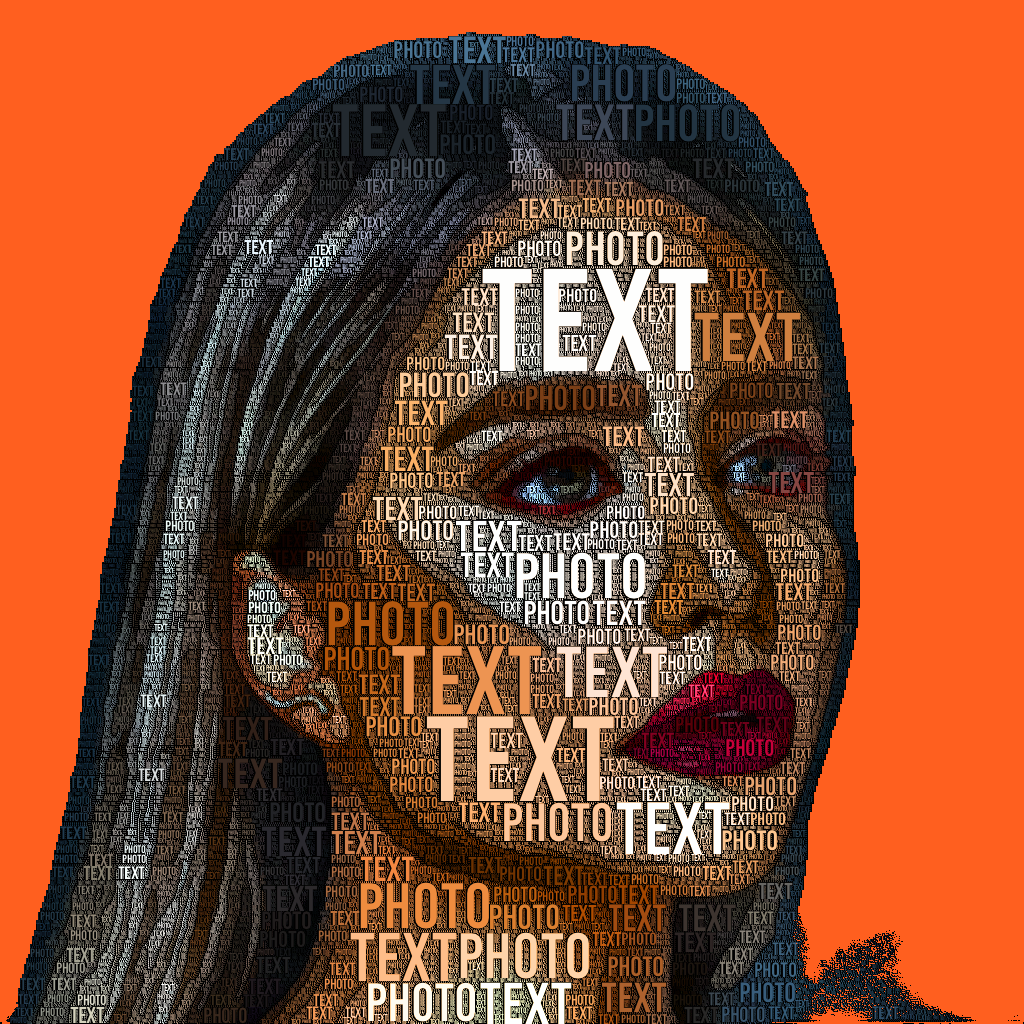
TextPhoto occupies a curious niche in the image editing landscape: it is not a general-purpose photo editor, nor is it a full-fledged typography tool. Instead, it converts pictures into text-based compositions, effectively turning any image into a word cloud made of your chosen words and fonts. The core proposition is simple: you supply a photo, up to twenty words, and a font, and the app generates a typographic rendering where the density and placement of text approximate the original image's shapes and tones. This is less about precision editing and more about creative reinterpretation, making TextPhoto a tool for quick, stylized visual statements rather than detailed graphic design.
Where TextPhoto stands out is in its immediate, one-click transformation. For users who want to create a personalized poster from a vacation photo or a social media avatar that spells out a favorite quote, the app removes the need for manual typesetting or complex masking. The output has a distinct word-cloud aesthetic, but with the structure of the underlying photo providing the composition. This can be visually striking when the source image has clear contrast and simple shapes, though results can become muddled with highly detailed or low-contrast photographs. The adjustable parameters—likely including word size, density, and color mapping—give some control over the final look, but the tool's simplicity means fine-tuning is limited.
The font support is a notable strength. With over a thousand open fonts available and the ability to upload custom TTF files, users have significant typographic flexibility. This is particularly valuable for branding or thematic projects where a specific typeface is essential. However, language support is entirely dependent on the chosen font, so multilingual or non-Latin scripts may not render correctly unless the font covers those characters. Additionally, the twenty-word limit is a hard constraint; longer texts or more nuanced messages cannot be accommodated in a single artwork, which may frustrate users seeking denser typography.
TextPhoto fits best into workflows where speed and novelty are prioritized over precision. Graphic designers might use it for rapid mockups or to generate starting points for further refinement in other tools. Artists could explore it as a generative medium, embracing the constraints as creative parameters. Hobbyists and social media users will find the app approachable for producing shareable, personalized images without needing design skills. For content creators, it offers a way to produce custom text-based visuals for thumbnails, posts, or simple branding.
There are practical caveats. The lack of transparent pricing—labeled as freemium but with no details on paid tiers—makes it difficult to assess value. The output quality varies with image complexity, and the tool is not suited for tasks requiring precise typographic control, such as full-page layouts or multi-layered designs. The alpha channel support for blending is a useful but niche feature, allowing partial typography effects when compositing over other images.
For a potential buyer or operator, TextPhoto should be evaluated as a creative utility rather than a professional-grade application. It is ideal for one-off projects or for users who want to experiment with text-based art without a steep learning curve. Those needing robust typography tools, unlimited word counts, or consistent high-fidelity output should look elsewhere. But for its intended purpose—turning photos into typographic keepsakes or eye-catching social content—TextPhoto delivers a straightforward, fun experience.
Who it's built for
Graphic designers
Why it fits
TextPhoto offers a quick way to generate typography mockups from photos, saving time compared to manual typesetting. It supports custom TTF fonts, allowing brand consistency.
Best value
Rapid prototyping of text-based visuals for client presentations or concept exploration.
Caution
Limited to 20 words and lacks fine-grained control over individual letter placement, so it's not a replacement for professional typesetting tools.
Artists
Why it fits
The app provides a generative medium for creating text art from images, with adjustable parameters to influence output. The creative constraint of 20 words can inspire focused compositions.
Best value
Exploring the intersection of photography and typography as an artistic expression.
Caution
Output quality depends heavily on the source image and font choice; complex images may yield less readable results.
Hobbyists
Why it fits
Simple one-click conversion makes it accessible for non-designers to create personalized gifts, decorations, or keepsakes from photos using meaningful words.
Best value
Turning a family photo into a word art poster with names or memories, no design skills required.
Caution
Free version may have limitations; pricing is unclear, so check before committing.
Social media users
Why it fits
Creates unique, shareable typography images that stand out in feeds without needing heavy editing skills. Supports multiple languages for diverse audiences.
Best value
Crafting custom profile pictures or posts with personal slogans or quotes overlaid on photos.
Caution
The 20-word limit may restrict longer quotes; blending features require some experimentation.
Key features
Typography Effect Creation
Converts a photo into a text-based image where words form the shapes and tones of the original picture using selected fonts.
Benefit
Produces visually striking typographic art with minimal effort, ideal for quick creative projects.
Limitation
Output quality varies with image complexity; highly detailed photos may lose clarity in text form.
Word Cloud-Like Images
Generates images similar to word clouds but using the photo's structure to arrange words, creating a visual summary.
Benefit
Offers a unique aesthetic that combines photo content with textual meaning, useful for conceptual visuals.
Limitation
Word density and readability can be hard to control; overlapping words may reduce legibility.
Font Selection and Custom Fonts
Access to over a thousand open fonts plus the ability to upload your own TTF font files.
Benefit
Provides extensive creative flexibility to match brand or personal style, including support for non-Latin scripts via custom fonts.
Limitation
Language support is entirely font-dependent; some fonts may not render certain characters correctly.
Adjustable Parameters
Allows tweaking settings like word size, density, and spacing to influence the final typography effect.
Benefit
Gives users control over the output's appearance, enabling fine-tuning for better aesthetics or readability.
Limitation
Parameters may not offer granular control; extreme adjustments can distort the image or produce unexpected results.
Alpha Channel and Blending
Supports transparent backgrounds so that the typography can be composited over other images or layers.
Benefit
Enables mixed-media designs, such as overlaying text art on photos or graphics for partial effects.
Limitation
Requires careful handling of transparency; fully transparent areas are ignored, which may limit blending options.
Real-world use cases
Personal Photo to Typographic Art
HobbyistsScenario
A user wants to turn a family portrait into a word art poster using names and meaningful words like 'love' and 'family'.
Solution
They upload the photo to TextPhoto, select a font, enter up to 20 words, and adjust parameters to create a typographic representation.
Outcome
Produces a personalized, sentimental piece of art that can be printed or shared digitally without design skills.
Word Cloud from Image
Content creatorsScenario
A blogger creates a visual summary of a travel landscape photo using descriptive words like 'adventure', 'sunset', 'peace'.
Solution
They use TextPhoto to convert the landscape into a word cloud-like image where the text forms the scene.
Outcome
Generates a unique, shareable graphic that conveys the essence of the photo in a textual form, engaging viewers.
Custom Artwork with Specific Words and Fonts
Graphic designersScenario
A small business owner designs a branded graphic for social media using their tagline and custom font.
Solution
They upload a relevant image, input the tagline as words, and upload their brand's TTF font to maintain consistency.
Outcome
Creates a professional-looking typography art that reinforces brand identity without hiring a designer.
Partial Typography Effect via Blending
ArtistsScenario
An artist wants to overlay text art on a photo with a transparent background for a mixed-media look.
Solution
They create typography in TextPhoto with alpha channel, then composite it over another image using an image editor.
Outcome
Achieves a layered effect where text art partially covers the background, adding depth and creativity.
Pros & cons
Pros
- Easy to use interface
- Large selection of fonts
- Customizable parameters for output control
- Supports multiple languages
- Alpha channel support for creative blending
Cons
- Limited to 20 words
- Post-processing effects may not be as advanced as dedicated photo editing software
- Output quality depends on the chosen font and parameters
Company information
Parsed from directory fields (lists, definition lists, or plain lines). Keys with 「: / :」 show as cards when most lines match; otherwise as a list. Confirm on official sources.
- TextPhoto Company TextPhoto Company name
- Text Photo .
- TextPhoto Twitter TextPhoto Twitter Link
- https://twitter.com/textphoto_app
- TextPhoto Support Email & Customer service contact & Refund contact etc. Here is the TextPhoto support email for customer service: [email protected] .
Frequently asked questions
What is TextPhoto and how does it work?General
TextPhoto is an app that converts your photos into typographic artwork made entirely of text. You select a picture, choose words (up to 20), pick a font, and the app generates an image where the words form the shapes and tones of the original photo.
How many words can I use in a single artwork?Limitations
You can use up to 20 words per artwork. This limit encourages concise, meaningful text but may not suit longer quotes or phrases.
Can I upload my own fonts?Workflow
Yes, TextPhoto supports custom TTF font files. You can upload your own fonts, in addition to choosing from over a thousand open fonts included in the app.
Does TextPhoto support languages other than English?Limitations
Yes, TextPhoto supports multiple languages, but the actual support depends on the font you choose. If the font includes glyphs for your language, it will work. For non-Latin scripts, you may need to provide a custom font.
Is TextPhoto free or paid?Pricing
TextPhoto is available as a freemium app, meaning there is a free version with basic features and possibly paid options for advanced functionality. Specific pricing details are not publicly listed, so you should check the app store or website for current information.
Can I blend TextPhoto output with other images?Workflow
Yes, TextPhoto supports alpha channels, so you can export typography with a transparent background. This allows you to blend the text art over other images using image editing software for partial typography effects.
Related tools in AI Photo Editor


A desktop photo software designed for anyone who wants high quality beautiful portraits, fast.

AI-powered photo and video editor for effortless enhancements and transformations.

AI-powered image transformation and digital asset management platform.


AI generator for fully editable, production-ready branded documents and professional assets.