
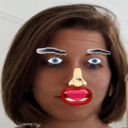
In-depth review: P5 and faceApi Cartoon Overlay
The P5 and faceApi Cartoon Overlay is a lightweight, open-source-style project that overlays cartoon elements such as hats, glasses, and mustaches onto faces in real-time video streams. It is built on p5.js for canvas rendering and face-api.js for face detection and landmark extraction, all running client-side in the browser. This tool is not a polished consumer product but a developer-focused experiment, ideal for web developers, creative coders, educators, and hobbyists who want to explore real-time face detection and manipulation without server dependencies or paid APIs.
Where it stands out is its real-time, client-side processing. The combination of p5.js and face-api.js enables live video frame analysis, detecting faces and facial landmarks to dynamically position and scale overlays. This means overlays track head movements and size changes, maintaining alignment even as the user moves. The tool's simplicity is both a strength and a limitation: it requires no backend, API keys, or subscriptions, making it easy to deploy locally or via a browser extension. However, this simplicity comes with trade-offs. Accuracy depends heavily on video quality and lighting conditions; in low light or with fast movement, face detection can become unreliable. The tool also lacks a user-friendly interface—customization of cartoon parts requires editing JavaScript code, which limits its appeal to non-developers.
The workflow fits into a niche of creative coding and educational projects. For web developers, it serves as a practical example of integrating face detection with canvas drawing, offering a foundation for building more complex face-driven applications. Creative coders can treat the customizable overlays as a sandbox for artistic experimentation, swapping images or modifying drawing functions to create unique effects. Educators can use it to demonstrate real-time computer vision concepts, landmark extraction, and event-driven animation in JavaScript. Hobbyists will appreciate the free, low-barrier entry point for adding fun effects to personal video calls, but they should be prepared for a hands-on setup process.
Who benefits most are those with at least basic JavaScript skills who are comfortable cloning a repository or copying code into an HTML file. The tool is not for casual users seeking a plug-and-play solution; there is no documentation, support, or commercial backing. The FAQ indicates that customization is possible by modifying the code, but this assumes technical literacy. For those willing to invest the time, the tool offers a genuine learning opportunity and a lightweight alternative to heavier commercial filters.
Limits matter here. The project is essentially a proof-of-concept, not a robust application. It may not work seamlessly in all browsers or with all video conferencing software; using it as a browser extension requires additional setup. The lack of pricing information suggests it is free, but also implies no guarantees of performance or updates. For commercial use, licensing of the underlying libraries (p5.js and face-api.js) should be verified, but the project itself appears to be an open-source example rather than a licensed product.
A practical buyer or operator should approach this tool as a learning resource or a prototyping base. If the goal is to quickly add cartoon overlays to a meeting without coding, this is not the right choice. But if you want to understand how real-time face detection works in the browser, or you need a customizable foundation for a creative project, this tool is a solid starting point. The dynamic positioning based on facial landmarks is genuinely impressive for a client-side solution, and the ability to swap overlay images means you can adapt it for different themes—holiday hats, animal ears, or even branded accessories. Just be ready to debug lighting issues and tweak code to get the best results.
Who it's built for
Web developers
Why it fits
This project provides a hands-on example of integrating face-api.js with p5.js for real-time video processing. It's a practical reference for building client-side face detection features with minimal server dependency.
Best value
Quickly prototype face overlay features without backend setup; the codebase is small and easy to dissect.
Caution
You'll need to adapt the code for production use; it lacks error handling and optimization for large-scale deployment.
Creative coders
Why it fits
The customizable cartoon parts and dynamic scaling offer a sandbox for artistic experimentation with facial landmarks. You can easily swap images or adjust drawing logic to create unique visual effects.
Best value
Freedom to modify overlays and see immediate visual feedback, enabling rapid creative iteration.
Caution
The tool is code-only; no visual editor exists, so all customization requires programming skills.
Educators
Why it fits
A live demonstration tool for teaching face detection, landmark extraction, and canvas manipulation in JavaScript. Students can see the concepts in action and tinker with the code.
Best value
Clear, real-time visualization of face-api.js landmarks and p5.js drawing, making abstract concepts tangible.
Caution
The project may not be robust enough for classroom use without additional setup; video quality and lighting affect reliability.
Hobbyists
Why it fits
A free, low-barrier entry point for adding fun overlays to personal video calls without needing a paid service. It's a fun weekend project to impress friends.
Best value
Zero cost and runs entirely in the browser; you can get it working with basic HTML/JS knowledge.
Caution
No pre-built installer or user-friendly interface; you'll need to host it locally or use a browser extension approach.
Key features
Real-time face detection and cartoon overlay
Combines p5.js and face-api.js to process video frames live, detect faces, and apply cartoon elements on top.
Benefit
No server-side processing needed; everything runs client-side, enabling low-latency interaction.
Limitation
Detection accuracy depends heavily on video quality and lighting; poor conditions may cause missed or jittery overlays.
Customizable cartoon parts
Overlay images (hats, glasses, mustaches) can be swapped or modified by editing the code to load different assets.
Benefit
Flexibility to match different themes or personal preferences without rebuilding the core logic.
Limitation
Requires manual code changes; no graphical interface for customization, limiting accessibility for non-coders.
Dynamic positioning and scaling based on facial landmarks
Uses landmark coordinates from face-api.js to align and resize overlays in real-time as the face moves or changes size.
Benefit
Overlays stay accurately placed even with head movements, providing a convincing augmented reality effect.
Limitation
Scaling may be imperfect for extreme angles or partial occlusions; performance can degrade with multiple faces.
Client-side JavaScript only
No backend or API keys required; all processing happens in the browser using JavaScript libraries.
Benefit
Easy to deploy locally or on static hosting; no server costs or privacy concerns with sending video data externally.
Limitation
Heavy reliance on client hardware; older devices may struggle with real-time processing, causing lag.
Free and open-source-like availability
The tool is free to use and modify, with source code accessible for anyone to download and adapt.
Benefit
No financial barrier to entry; you can experiment and learn without commitment.
Limitation
No official support, documentation, or updates; you rely on community resources and your own debugging.
Real-world use cases
Adding fun visual effects to online meetings and video calls
HobbyistsScenario
A user wants to entertain colleagues during a remote team meeting by wearing a cartoon hat and glasses that track their face in real-time.
Solution
The tool runs as a browser extension or local web page that captures the webcam feed and overlays cartoon parts using face-api.js landmarks.
Outcome
Adds a lighthearted, engaging element to otherwise routine video calls, boosting team morale.
Creating entertaining video content with cartoon avatars
Creative codersScenario
A content creator records a video for social media where they appear as a cartoon character with animated props.
Solution
They use the tool to apply cartoon overlays during recording, with real-time tracking ensuring the props follow facial movements.
Outcome
Produces unique, engaging content without needing advanced animation skills or expensive software.
Demonstrating real-time face detection and manipulation using JavaScript libraries
EducatorsScenario
An educator prepares a coding tutorial on integrating face-api.js with p5.js for real-time video effects.
Solution
They walk through the project code, showing how to load models, detect faces, and draw overlays, with live demos.
Outcome
Provides a concrete, interactive example that reinforces learning and inspires students to build their own projects.
Prototyping interactive face-based web applications
Web developersScenario
A web developer explores building a virtual try-on app for accessories like glasses or hats.
Solution
They start with this project as a base, modifying the cartoon parts to realistic product images and testing alignment accuracy.
Outcome
Accelerates prototyping by reusing existing face detection and overlay logic, reducing initial development time.
Pros & cons
Pros
- Engaging and entertaining visual effect
- Demonstrates real-time face detection capabilities
- Customizable with different cartoon parts
- Uses widely available JavaScript libraries (p5.js and face-api.js)
Cons
- Performance may be limited by processing power, especially with multiple faces
- Accuracy of face detection can be affected by lighting and video quality
- Requires setup and configuration of p5.js and face-api.js
- Cartoon overlays may not perfectly align with all facial expressions
Frequently asked questions
What libraries are used in this project?General
This project uses p5.js for drawing and canvas manipulation, and face-api.js for face detection and landmark extraction.
How accurate is the face detection?Limitations
The accuracy of face detection depends on the quality of the video and lighting conditions. face-api.js provides robust face detection, but performance may vary. In well-lit conditions with a clear view, it works reliably; in low light or with fast movement, detection may become jittery or fail.
Can I customize the cartoon parts?Workflow
Yes, the cartoon parts can be customized by modifying the code to load different images or drawing different shapes. You need to edit the JavaScript source to replace the overlay assets or adjust drawing functions.
Is this tool free to use?Pricing
Yes, the tool is free to use and modify. There are no paid tiers or subscriptions. However, it comes with no warranty or official support.
Do I need coding experience to use it?Fit
Yes, basic knowledge of HTML, CSS, and JavaScript is required to set up and customize the tool. There is no graphical user interface for configuration.
Can I use this in a commercial product?Limitations
The tool is provided as open-source-like code, but you should check the licenses of p5.js and face-api.js. Generally, both are permissive (MIT), but you must comply with their terms. The project itself has no explicit license, so use at your own risk.
Related tools in AI Style Transfer


Lenso.ai is an AI-powered reverse image search platform for finding similar and related images.


Nero offers multimedia software and hardware solutions, including AI-powered tools.

AI-powered video creation and editing tool for marketing and content creation.

All-in-one AI platform for cinematic video generation and professional photo editing.