
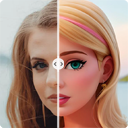
In-depth review: Cartoonize Your Photo
Cartoonize Your Photo is a browser extension that applies a cartoon filter to any image with a single click. It is designed for users who want a quick, humorous transformation without any editing skills or software overhead. The tool's core appeal lies in its extreme simplicity: upload a photo, click a button, and receive a cartoonized version ready for social media profile pictures, pranks, or casual fun. There are no sliders, presets, or manual adjustments — the filter is applied automatically, making the process nearly instantaneous. This focus on speed and ease of use positions it as a utility for non-editors, social media enthusiasts, and anyone seeking a lighthearted twist on their photos without commitment. However, the lack of customization means users have no control over the intensity, style, or quality of the effect. The output resolution likely matches the original, but detail loss or artifacts may occur, especially with complex backgrounds or fine textures. The browser extension format adds convenience, allowing on-the-go editing without uploading to a separate website, which may appeal to privacy-conscious users who prefer local processing. That said, the tool's free model raises questions about long-term support, updates, and data handling — no privacy policy or company information is provided. For its intended use case — creating funny profile pictures quickly — it delivers. But users expecting advanced features, batch processing, or consistent quality across different image types may find it limiting. The tool is best suited for casual, one-off tasks where the novelty of the cartoon effect matters more than precision. In a market crowded with AI-powered editors offering fine-grained control, Cartoonize Your Photo stands out only by its sheer simplicity. It is not a tool for professionals or serious projects; it is a digital toy for anyone who wants to turn a friend's photo into a cartoon for a laugh. The decision to use it hinges on whether speed and zero learning curve outweigh the absence of creative control. For the target audience — social media users and individuals looking for fun profile pictures — it serves its purpose adequately, provided expectations are aligned with its limited scope.
Who it's built for
Social media users
Why it fits
Quickly refresh profile pictures for Facebook, Twitter, or WhatsApp with a humorous cartoon effect, no editing skills needed.
Best value
Instant transformation for a temporary or event-based profile update.
Caution
No control over the filter intensity; results may not suit every photo.
Individuals looking for fun profile pictures
Why it fits
Creates a creative, funny twist on personal photos in one click, ideal for jokes or casual use.
Best value
Effortless humor without learning any software.
Caution
Limited to cartoon effect only; no other filters or adjustments.
Non-editors
Why it fits
Perfect for users who want a simple transformation without any photo editing experience or desire to learn.
Best value
Zero learning curve; just click and get a cartoon version.
Caution
No customization means you get what the algorithm decides.
Browser extension users
Why it fits
Works as a browser extension, allowing on-the-go editing without uploading to a separate website.
Best value
Convenient access from your browser toolbar.
Caution
Extension may require permissions; offline functionality uncertain.
Key features
One-click cartoon filter application
Applies a cartoon effect to your photo with a single click, transforming it into a stylized, funny version.
Benefit
Extreme speed and simplicity; no need to adjust sliders or settings.
Limitation
No control over the filter's style or intensity; may produce inconsistent results on different photos.
Browser extension availability
Available as a browser extension, accessible from the toolbar without visiting a separate website.
Benefit
Quick access and potentially faster processing; works within your current browsing context.
Limitation
Requires browser extension installation; may not work on all browsers or mobile devices.
Free usage model
The tool is completely free to use with no hidden costs or premium tiers.
Benefit
No financial commitment; ideal for occasional or experimental use.
Limitation
No premium features or support; sustainability and updates may be uncertain.
No customization options
Deliberately lacks sliders, presets, or manual adjustments for the cartoon effect.
Benefit
Ensures a fast, foolproof experience for users who want simplicity.
Limitation
Users cannot fine-tune the effect; may not achieve desired look for specific images.
Output quality and resolution
Outputs a cartoonized version likely at the original image resolution, though details may be lost or artifacts introduced.
Benefit
Preserves original size for direct use on social media.
Limitation
Potential loss of fine details or introduction of artifacts; no option to adjust output quality.
Real-world use cases
Creating funny profile pictures
Social media userScenario
A user wants to quickly update their social media profile with a humorous cartoon version of themselves for a temporary event or joke.
Solution
Upload the photo to the extension, click the cartoonize button, and download the result in seconds.
Outcome
Instant, funny transformation without any editing skills.
Quick photo pranks or gifts
Casual userScenario
Turning a friend's photo into a cartoon as a lighthearted prank or gift, requiring minimal effort and no editing skills.
Solution
Open the extension, load the friend's photo, apply the filter, and share the cartoonized image.
Outcome
Effortless creation of a personalized, humorous image.
Testing cartoon filters without commitment
Curious userScenario
A user curious about cartoon effects but not ready to invest in paid software; uses this free tool to experiment.
Solution
Use the free extension to apply the cartoon filter to various photos and see if the style appeals.
Outcome
Risk-free trial of cartoon effect with no cost or sign-up.
Batch processing for fun projects
HobbyistScenario
A user wants to apply the cartoon filter to multiple photos one by one for a themed album or event.
Solution
Manually process each photo through the extension sequentially, saving each result.
Outcome
Enables a consistent cartoon style across a set of images without needing batch processing features.
Pros & cons
Pros
- Easy to use with one-click functionality
- Quickly transforms photos into cartoons
- Creates funny and creative images
Cons
- Functionality is limited to cartoon filter application
- May not offer advanced customization options
Frequently asked questions
Is Cartoonize Your Photo free to use?Pricing
Yes, the tool is completely free with no hidden costs or premium tiers. However, there is no information about future pricing changes or sustainability.
Can I customize the cartoon effect?Limitations
No, the tool offers no customization options such as sliders, presets, or manual adjustments. The effect is applied automatically with one click.
What image formats are supported?Workflow
The tool likely supports common image formats like JPEG and PNG, but specifics are not provided. Most browser extensions handle standard formats.
Does the tool work on mobile devices?Workflow
The tool is a browser extension, so it works on desktop browsers that support extensions. Mobile browsers typically do not support extensions, so it is unlikely to work on phones or tablets.
How does the browser extension compare to the web version?Comparison
The tool is only available as a browser extension; there is no separate web version. The extension provides quick access from the toolbar without needing to visit a website.
Is my photo privacy protected when using this tool?General
Privacy practices are not explicitly stated. As a browser extension, it may process images locally or upload them to a server. Users should review permissions and consider sensitive photos carefully.
Related tools in AI Photo Editor

A desktop photo software designed for anyone who wants high quality beautiful portraits, fast.

AI-powered photo and video editor for effortless enhancements and transformations.


Free AI photo editor with filters, image generation, video enhancement, and more.

AI generator for fully editable, production-ready branded documents and professional assets.
